From Delayed Systems to Real-Time Warehouse Operations
Client
Utz Distribution Centers
Year
2025
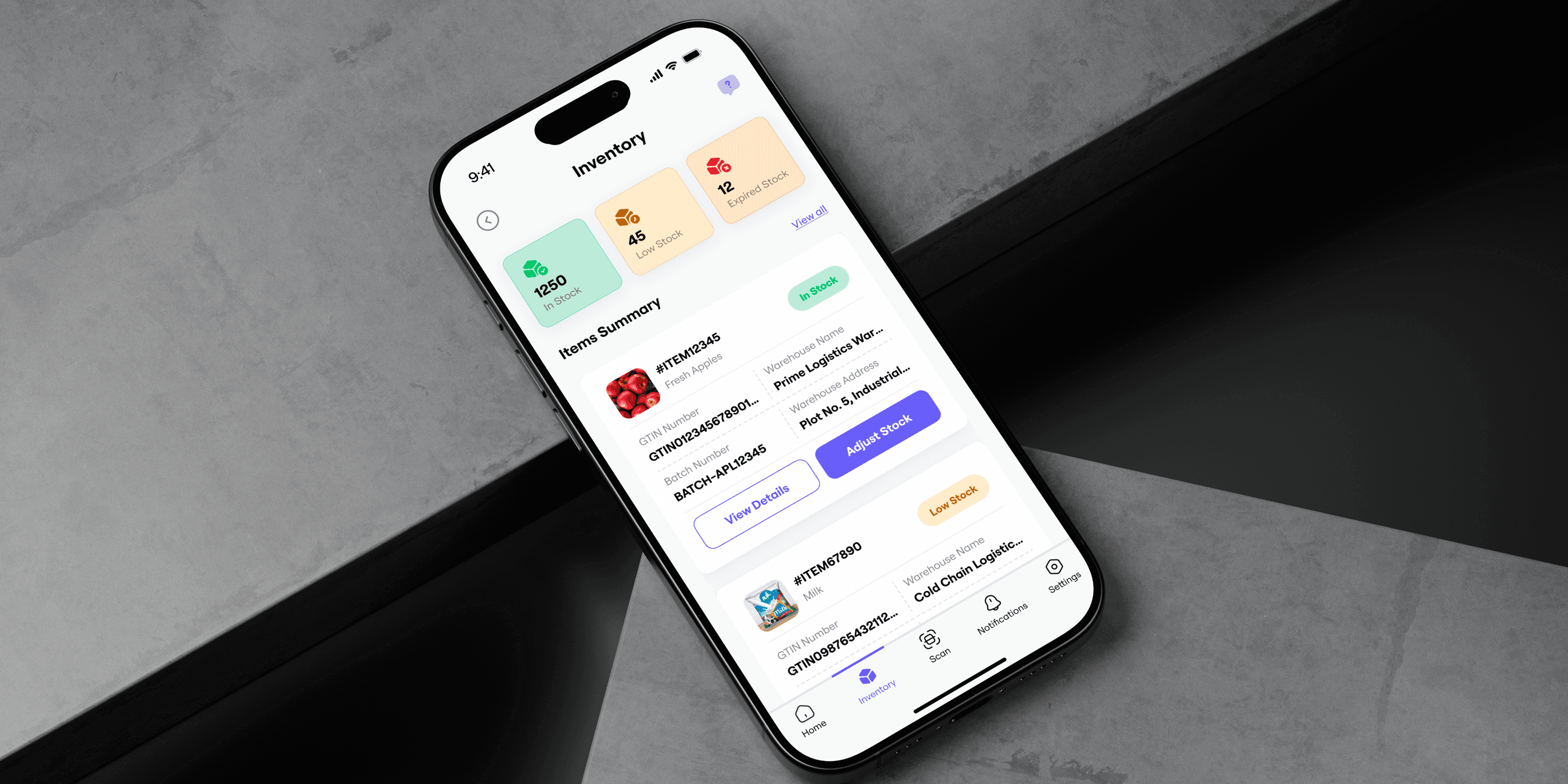
A mobile-first warehouse execution platform designed to streamline critical inventory operations such as receipts, counting, and stock adjustments. This solution eliminates the dependency on desktop terminals by enabling operators to perform tasks directly from the warehouse floor in real time.
The platform integrates seamlessly with Microsoft Dynamics 365, allowing instant validation, automated journal creation, and live inventory updates. By introducing scan-based interactions, intelligent data handling, and contextual error feedback, the system significantly reduces manual effort and operational errors.
This project bridges the gap between physical warehouse activities and backend systems, ensuring that inventory data reflects real-world actions instantly. The result is a faster, more accurate, and scalable workflow that improves efficiency, enhances traceability, and empowers warehouse teams with a frictionless digital experience.
Scope of Work
The Challenge
Warehouse operations at distribution centers were inherently fast-paced and time-sensitive, yet the systems supporting them operated with significant delays. Tasks such as receiving goods, counting inventory, and making stock adjustments were performed physically on the warehouse floor but recorded later through desktop terminals.
This disconnect created a gap between actual operations and system data, leading to inefficiencies, errors, and reduced trust in inventory accuracy. Operators were forced to rely on memory and manual entry, increasing the chances of mistakes and slowing down the overall workflow.
The core challenge was not just improving usability, but redesigning how and when data is captured within the system to align with real-world execution.
This created a fundamental disconnect:
Reality was happening now.
The system was catching up later.
What this looked like in practice:
Operators completed tasks on the floor
Walked back to a terminal
Re-entered data manually
Validated entries after the fact
Fixed discrepancies later
The hidden cost of this gap:
3–5 minute delay per transaction
20–30% time lost in movement
High frequency of manual errors
Continuous rework due to mismatches
Increased cognitive load on operators

The Real Problem
At its core, the issue wasn’t just inefficiency.
It was a system designed for control and validation,
not for speed and execution.
Key Challenge
Delayed data entry leading to inventory mismatches
High dependency on fixed desktop terminals
Increased manual effort and repetitive tasks
Lack of real-time visibility into operations
Fragmented workflows across multiple systems

Design Process
To address the operational and system-level challenges, a structured and user-centered design approach was followed. The process focused on deeply understanding user behavior, identifying friction points, and iteratively refining solutions to ensure usability and scalability.
Rather than treating this as a UI design, the process emphasized rethinking workflows from the ground up, ensuring that the final solution aligned with both user needs and backend system constraints.
Approach
We followed a structured, user-centered design process:
Empathize → Define → Rethink → Simplify → Prototype → Test → Iterate
Each stage focused on one goal:
Remove friction between action and system response
Empathize & Understand the Problem
The initial phase focused on understanding the real-world environment in which warehouse operators function. Unlike traditional software users, these users operate in physically demanding conditions where speed, accuracy, and efficiency are critical.
Observations and discussions revealed that operators were constantly moving, handling goods, and multitasking, leaving little room for complex interactions or delayed system responses. The existing systems did not align with this reality, creating friction at every step.
Research Activities
Conducted discussions with warehouse operators and stakeholders
Analyzed existing workflows and system dependencies
Reviewed backend processes and validation logic

Research Methods
Stakeholder Discussions
Warehouse operators (primary users)
Inventory managers (data owners)
IT teams (system constraints)
Workflow Observation
Mapped real-world processes:
Movement patterns
Task repetition cycles
Points of delay and friction
System Analysis
Studied Microsoft Dynamics 365 workflows:
Transfer orders & purchase orders
Inventory journals
Validation rules
Data dependencies


Key Insights
The research uncovered several important insights that shaped the direction of the solution:
Users prioritize speed and simplicity over feature-rich interfaces
Mobility is essential, as work happens on the warehouse floor
Manual data entry significantly increases the risk of errors
Users require clear and immediate system feedback to proceed confidently
Repetitive tasks must be optimized for efficiency
Define the Problem & User Personas
Problem Statement
Based on the research insights, the problem was defined around the misalignment between system design and real-world workflows.
Warehouse users required a solution that allows them to capture and process data instantly, without interrupting their physical tasks or relying on delayed system interactions.


User Personas
Warehouse Operator
Warehouse operators are the primary users of the system. They work in fast-paced environments and need to complete tasks quickly with minimal friction. Their focus is on speed and accuracy, and they have little tolerance for complex or time-consuming processes.
Pain Point: Too many steps slow them down
Inventory Manager
Inventory managers are responsible for ensuring data accuracy and resolving discrepancies. They rely heavily on system data to make decisions and require visibility into all operations. Their primary concern is maintaining reliable and traceable records.
Pain Point: Data is often outdated or incorrect
Operations Head
Operations heads focus on overall efficiency and scalability. They need real-time insights into warehouse performance and rely on accurate data to optimize processes. Their goal is to ensure smooth and efficient operations across the organization.
Pain Point: Lack of real-time visibility


Ideate & Brainstorm Solutions
The ideation phase focused on identifying ways to eliminate delays and simplify interactions. Instead of improving existing workflows, the approach was to reimagine how the system could operate in real time alongside the user.
This required shifting from a system-centered approach to a user-action-driven model, in which every user action is instantly captured and processed.
Key Question
What if the system operated at the same speed as the warehouse?
Solution Directions
Introduce a mobile-first platform to support on-ground operations
Enable scan-based interactions to reduce manual input
Provide real-time validation and feedback
Break down complex workflows into modular, task-based flows


User Flow Testing
Wireframing focused on simplifying user interactions and minimizing the number of steps required to complete tasks. Each flow was designed to be intuitive, efficient, and easy to repeat, ensuring that users could perform actions quickly without unnecessary cognitive load.
Every step must justify its existence
Workflow Transformation
Before
Walk → Remember → Enter → Validate → Fix
After
Scan → Add → Confirm → Done
User Flow Example
Onboarding Flow
The onboarding process was designed to be quick and straightforward, allowing users to set their context (such as warehouse selection) and immediately begin performing tasks without unnecessary setup.
Task Flow
The core task flow enables users to select a module, add items through scanning or manual input, review their entries, and commit the data. This flow was optimized to reduce steps and enable rapid execution of repetitive tasks.
Impact Flow
The impact flow ensures that every user action is validated instantly, providing immediate feedback and syncing data with the backend system in real time. This eliminates delays and ensures data accuracy.

Iteration Based on Feedback
Multiple iterations were conducted to refine the design based on feedback from stakeholders and internal reviews. The focus was on improving speed, clarity, and usability while ensuring that the system handled real-world scenarios effectively.
Key Improvements
Simplified input fields to reduce user effort
Optimized scanning workflows for faster interactions
Enhanced error messages to provide clear guidance
Improved visibility of data before final submission


Visual Design & Branding
The visual design was built to support fast decision-making and ease of use in a demanding environment. The focus was on creating a clean and structured interface that reduces distractions and highlights key actions.
Design Principles
Prioritize clarity and readability
Use consistent layouts and components
Provide clear visual feedback for user actions
Visual Elements
Color-coded feedback for success and errors
Clean typography for easy scanning
Structured layouts for better information hierarchy

High-Fidelity Design & Final Prototypes
High-fidelity designs and interactive prototypes were created to simulate real-world usage and validate the overall experience. The final product provides a seamless interface that supports real-time operations and reduces friction in everyday tasks.
Key Features
Centralized Dashboard for Quick Access to Tasks
A unified control hub that provides direct access to core operations like receipts, counting, and adjustments. It simplifies navigation and enables users to quickly start tasks without unnecessary steps.

Integrated Scanning for Fast Item Entry
Enables instant item capture through barcode/GTIN scanning, reducing manual input and improving both speed and accuracy in high-volume workflows.


Editable Item Lists with Auto-Aggregation
Allows users to add, edit, and review items dynamically, while automatically aggregating quantities to ensure accurate and consistent data before submission.

Real-Time System Feedback and Validation
Provides immediate feedback on user actions through clear success and error states, helping users identify issues early and maintain data accuracy.


Seamless Backend Integration for Data Processing
Ensures all actions are instantly synced with backend systems, enabling real-time updates, reliable data processing, and smooth system operations.

Impact
Operational Impact
40–60% faster task completion
~30% reduction in manual errors
Significant reduction in movement inefficiency
Near real-time inventory updates
Business Impact
Improved inventory accuracy
Faster warehouse throughput
Better audit and traceability
Scalable system for multiple locations
Reflections
This project highlighted the importance of aligning system design with real-world workflows. It reinforced the idea that simplicity and speed are critical in enterprise environments, and that user trust depends heavily on system reliability and feedback.
Key Learnings
Simplifying workflows has a direct impact on efficiency
Clear feedback improves user confidence
Real-time systems enhance decision-making
Conclusion
This project demonstrates how complex enterprise workflows can be transformed into efficient, user-friendly experiences by focusing on real-time execution and simplicity.
By bridging the gap between physical operations and digital systems, the solution enables faster processes, reduces errors, and improves overall efficiency.
The result is a system that not only supports warehouse operations but enhances them, making them more reliable, scalable, and aligned with real-world needs.
Final Thought
When systems operate at the speed of users,
operations don’t just improve - they transform.