Build, deploy, and orchestrate AI agents - your workflows smarter, tireless teammate that never takes a break.
Client
Agent Garage
Year
2026
This enterprise-grade Agentic AI SaaS platform empowers businesses to design, deploy, and orchestrate autonomous AI agents across complex workflows. It moves beyond traditional automation by enabling agents to reason, act, and adapt in real time - handling multi-step processes with minimal human intervention.
Organizations can automate repetitive tasks, streamline operations, and accelerate decision-making through data-driven insights. With seamless integrations into existing tools and systems, it fits naturally within current ecosystems while significantly enhancing overall capabilities.
Built on a scalable and secure architecture, the platform supports deploying multiple agents across teams and workflows, ensuring consistent performance at scale. Real-time visibility and intelligent orchestration allow continuous monitoring, optimization, and improvement of processes.
In essence, it converts manual workflows into intelligent, autonomous systems - driving efficiency, reducing operational overhead, and enabling smarter business outcomes.
Scope of Work

Project Overview
This enterprise-grade Agentic AI SaaS platform enables businesses to build, deploy, and orchestrate autonomous AI agents across complex workflows - without heavy reliance on engineering teams.
Unlike traditional automation tools that follow fixed rules, its agents can reason, adapt, and collaborate in real time, handling multi-step enterprise processes with minimal human intervention. It moves beyond chatbots and RPA to deliver true autonomous orchestration.
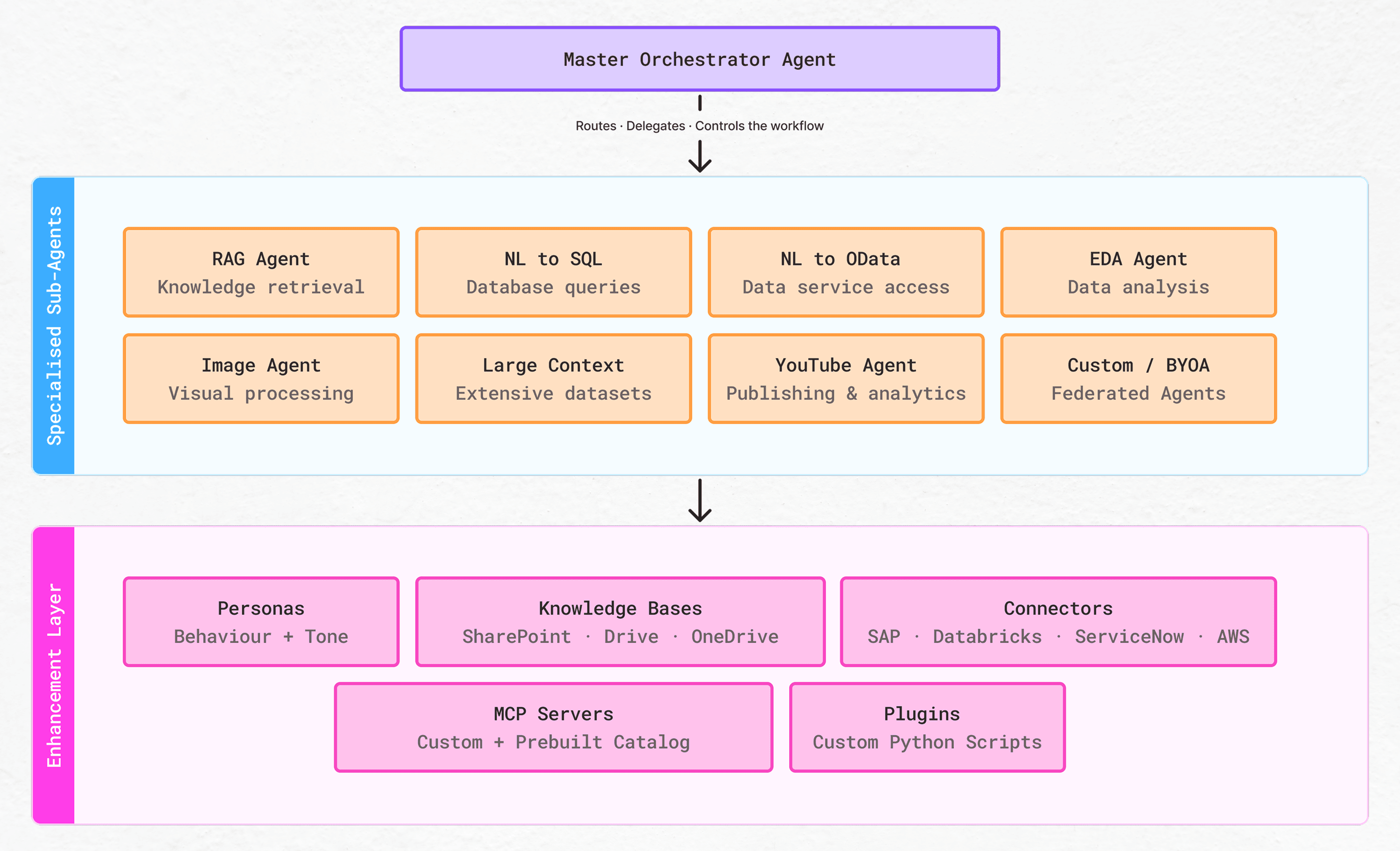
Built on a Subject Area Architecture with an Agent-to-Agent (A2A) protocol, the platform supports federated multi-agent collaboration, including Bring Your Own Agent (BYOA) integrations with tools like SAP, ServiceNow, and Salesforce - allowing it to fit seamlessly into enterprise ecosystems.
As the sole Senior Product Designer, I owned the end-to-end product experience - from initial concept to final delivery. This included designing two interconnected portals, building a complete design system, and continuously shaping new features across the platform’s lifecycle.


My Role
Senior Project Designer at Celebal Technologies
Led end-to-end UX design
Translated complex multi-agent AI architecture into intuitive interfaces
Collaborated with Product Managers, Stakeholders, Data Engineers, Front-end Developers, Back-end Developers, QA Testing Team and AI Teams.
Designed scalable experiences for enterprise-level multi-role users

Problem Statement
Through discovery research and stakeholder alignment, we identified five compounding failure modes across enterprise environments that were blocking intelligent automation adoption.
Enterprises had the tools. They lacked the orchestration layer that connected them, the interaction model that made them usable, and the governance surface that made them trustworthy. This SaaS application was built to be all three.
Fragmented Workflows
Enterprise teams were manually routing data between a dozen isolated tools. What looked like "process" was humans acting as connectors between systems that couldn't talk to each other
What looked like a “process” was often just:
👉 copy → paste → switch tab → repeat
High Engineering Dependency
Business teams had automation intent but zero agency. Every workflow change required raising a developer request — creating weeks-long delays that killed momentum and stifled innovation.
👉 Want to automate a workflow?
Better raise a ticket… and wait.
Poor AI Adoption
AI capabilities existed but weren't accessible. Steep learning curves, no clear interaction patterns, and absence of trust led to powerful tools being ignored by the people who needed them most.
Too complex for non-technical users
Lack of clear interaction patterns
Steep learning curves
👉 Result: Powerful tools… barely used.
Lack of Orchestration
Individual AI agents could perform isolated tasks - but had no way to communicate, hand off work, or collaborate. A collection of isolated intelligence isn't a system.
👉 It wasn’t a system.
It was a collection of isolated intelligence.
Zero Governance Layer
As AI tools proliferated, there was no unified observability — no way for admins to see what agents were doing, control access, audit decisions, or enforce governance. Enterprise IT and compliance teams couldn't accept what they couldn't see.
The problem wasn’t the absence of AI - it was the absence of structured, connected, and usable AI workflows.
Because having multiple smart agents means nothing if:
👉 they don’t know when, how, or who to work with.

Business Goals and Success Metrics
Before designing anything, I worked with PMs and stakeholders to define measurable goals that would guide every design decision and allow us to evaluate whether the product was genuinely working.
Key Insights
Designing for non-technical users requires simplifying not just UI, but mental models of complex systems like AI workflows
Guided defaults and progressive disclosure significantly reduce onboarding friction and improve adoption
AI products succeed when users feel in control of outcomes, not just configuring inputs
Introducing familiar interaction patterns (like @-references) can dramatically improve system usability and accuracy
Enterprise trust is built through transparency, auditability, and control — not just features
A strong design system + modular architecture is critical for scaling across industries without redesigning experiences
Measuring success through behavioral metrics (drop-offs, task completion, accuracy) is more meaningful than feature usage
Automating workflows is valuable only when it leads to real, measurable operational impact (time, effort, decision speed)
Cross-functional alignment early on ensures design decisions are tied to business outcomes, not assumptions
AI adoption is less about capability and more about reducing perceived complexity and risk

Product & System Context
Designing for an AI-native product required deeply understanding the architecture — because in this domain, interface decisions have functional consequences, not just visual ones.
The platform runs on Databricks' Mosaic AI Agent framework, using Unity Catalog for governance, MLflow for performance tracking, and Agent Bricks for development. Understanding this stack helped me design a UI that accurately reflected system state — not an idealised version of it.
Critically, the product encompasses two separate portals with different user types, different mental models, and different risk profiles — but sharing the same underlying system. Designing these coherently required treating them as parallel products, not one product with two views.
User Research Overview
Research wasn't a phase — it was a continuous practice throughout the project. Here's the approach and what each method revealed.
Stakeholder Interviews — Discovery Phase
Conducted structured interviews with PMs, AI engineers, and enterprise clients to map current-state workflows, identify automation ambitions, and understand what "control" meant to different roles. Key finding: business teams had high intent but no agency — every automation idea died in the development queue.
Contextual Observation — How Teams Work Today
Observed how enterprise operations teams currently handled multi-step workflows — noting tool-switching patterns, manual handoff points, and moments of frustration. This revealed the copy-paste loop problem and the depth of context-switching overhead.
AI Mental Model Mapping
Ran card sorting and mental model exercises specifically around how different user types conceptualised "AI agents" and "orchestration." Critical for designing terminology and visual metaphors that felt intuitive rather than technical. Found large gaps between engineer and business analyst mental models.
Competitive & Analogous Analysis
Studied existing workflow automation tools (Zapier, n8n, Microsoft Power Automate), observability platforms, and non-AI orchestration tools. Also studied analogous domains: no-code builders, IDEs, and pipeline tools. Identified what conventions could be borrowed vs what required novel patterns.
Iterative User Feedback Sessions
Post-feature delivery, conducted regular feedback sessions with enterprise users — including business analysts, operations managers, and IT admins. Used structured tasks with think-aloud protocol. Findings directly shaped progressive disclosure decisions and the Admin Portal's information hierarchy.


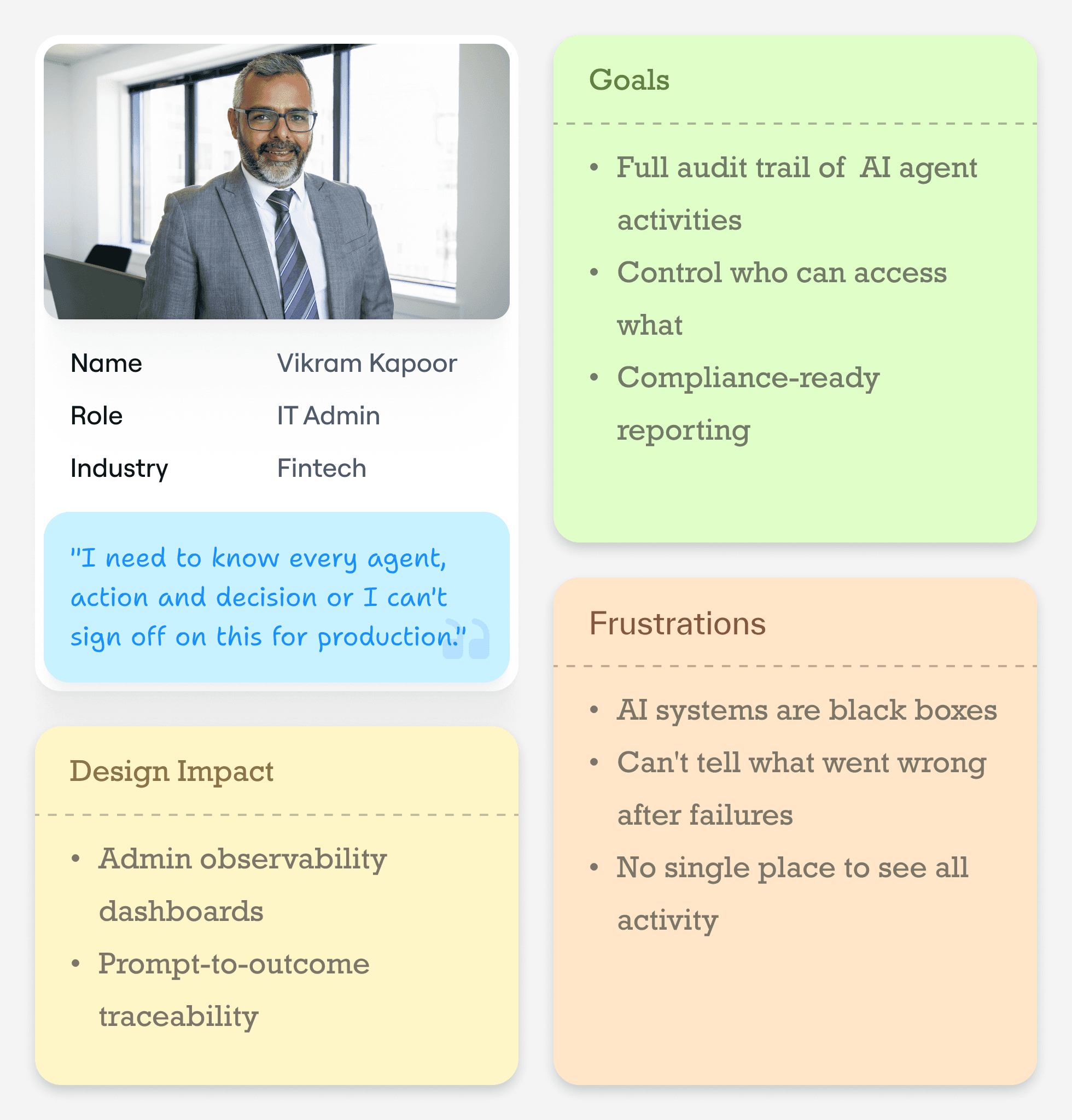
User Segmentation & Persona
This Product is built for a diverse set of users - from business analysts and operations managers to IT admins, AI/ML engineers, and enterprise executives - each bringing different goals, technical expertise, and expectations from the platform.
Business analysts rely on a guided, no-code experience to build and run AI workflows with minimal friction, while operations managers need real-time visibility into running agents along with clear ways to intervene when workflows fail.
IT admins and platform owners focus on governance, ensuring secure access, compliance, and complete auditability across the system, whereas AI/ML engineers require deeper control, advanced configurations, and the flexibility to build complex, custom agents.
At the leadership level, enterprise executives are less concerned with how the system works and more focused on outcomes - tracking ROI, adoption, and overall business impact through high-level dashboards.
The core challenge was not designing separate experiences, but creating a layered system that simplifies complexity for beginners, enables control for operators, provides depth for experts, and delivers clarity for decision-makers.

Pain Points & Opportunity Areas
Every pain point in the research became a design brief. Here's how specific user frustrations mapped to specific design interventions.

Information Architecture
The platform is structured to serve two fundamentally different user groups — business users and enterprise admins — while operating on a shared system. The focus was on defining clear hierarchies, intuitive navigation, and logical module relationships before designing individual screens.
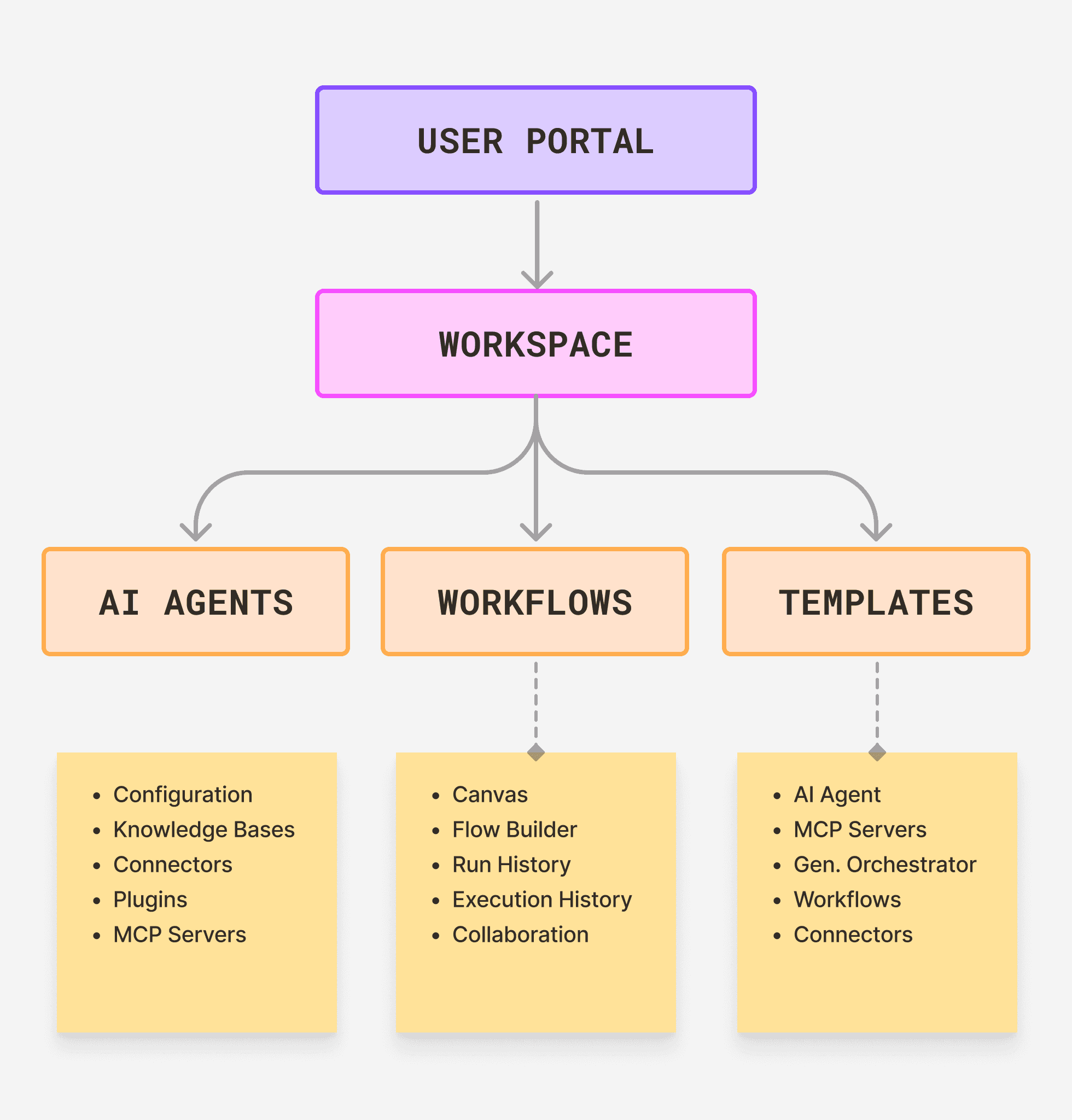
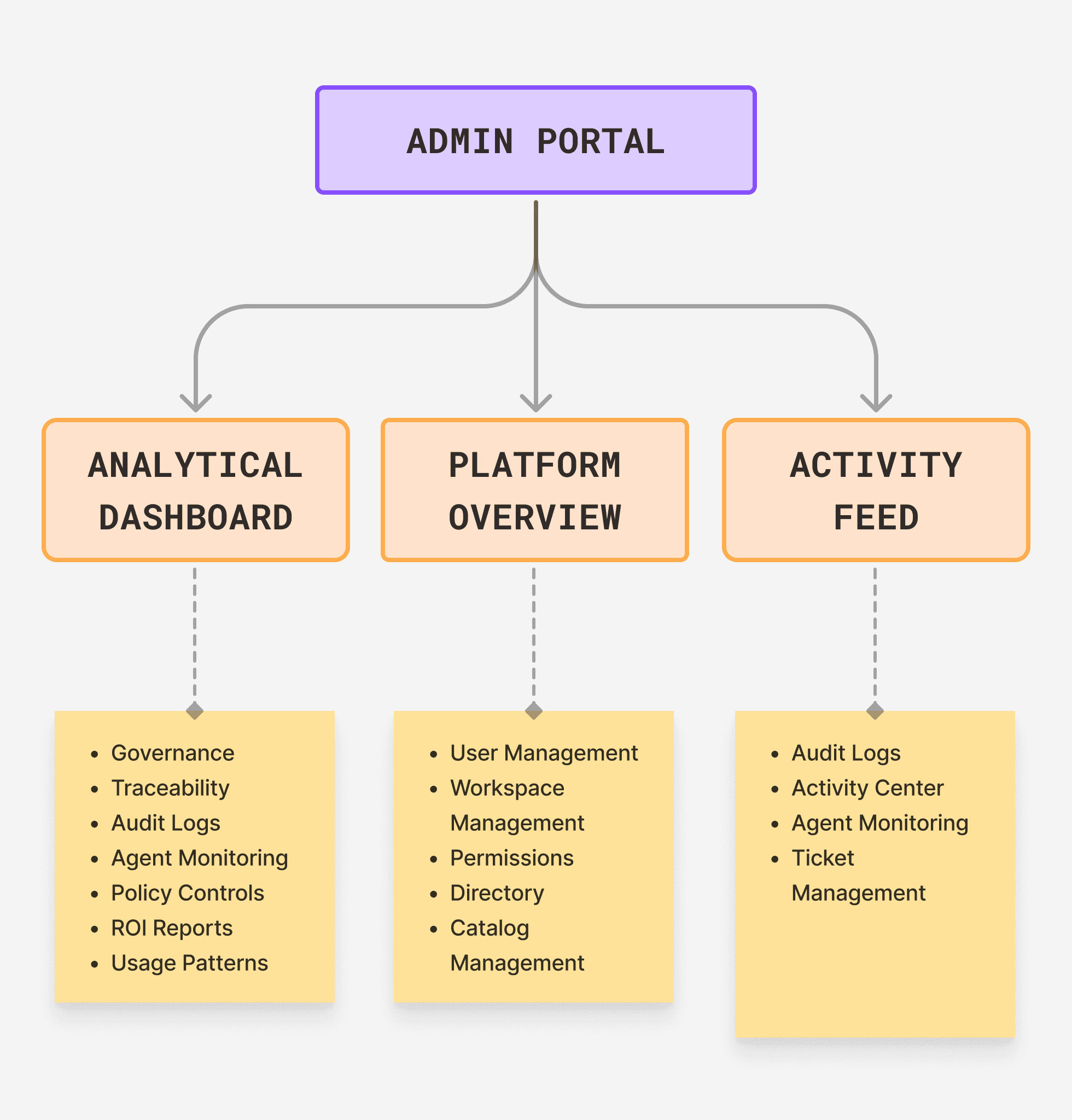
To support distinct workflows and mental models, the experience is divided into two core portals — User Portal and Admin Portal — each purpose-built for its audience.
User Portal
The User Portal is designed for creating and managing AI workflows, with a focus on build, orchestration, and performance visibility.
Workspace → My Agents, Workflows, Templates
Agent Builder → Configuration, Knowledge Base (SAP, Databricks, Service Now, SQL Database, AWS S3 Bucket, Blob Storage, Microsoft ecosystem, Custom, etc), Connectors (SAP, Databricks, Service Now, SQL Database, AWS S3 Bucket, Blob Storage, Microsoft ecosystem, Custom, etc), Plugins (Multiple Python scripts), MCP Servers (Custom or Utilized from Prebuilt Catalog)
Orchestrator → Canvas, Flow Builder, Run History, Testing Screen
Analytics → Usage Metrics, Performance, Insights
Admin Portal
The Admin Portal is built for governance, control, and system-wide oversight, enabling enterprise-grade management.
Dashboard → Platform Overview, Activity Feed
User Management → Users, Roles, Permissions
Governance → Audit Logs, Agent Monitoring, Policy Controls
Analytics → Platform Metrics, ROI Reports, Usage Patterns
Core Screens and Decisions
Every interaction was designed to reduce ambiguity and make complex AI behavior easier to understand, guiding users toward the right actions without exposing unnecessary complexity.
Small details — like how users reference agents or build workflows — ensure the system feels predictable and intuitive rather than confusing.
The experience balances power with clarity by introducing complexity gradually, so users are not overwhelmed while still enabling advanced use cases.
Error prevention and clear feedback were key, helping users avoid mistakes and stay on track without friction.
Transparency throughout the system ensures users always know what’s happening, building trust and confidence in the product.
Agent Run Monitor
A dedicated run-time view showing the active orchestration's execution state. Each agent in the pipeline shows its current status (Waiting / Running / Complete / Error) with a real-time log of its activity. The master orchestrator's instruction is shown at the top with @-referenced agents highlighted as chips. Users can pause, resume, or terminate at any point.
Pattern: @ Agent Referencing with Autocomplete
What happens: Typing “@” surfaces agents; selection inserts a visual chip
Why it matters: Eliminates ambiguity in instructions
Impact: Reduced orchestration errors significantly

Canvas Drag-and-Drop with Smart Snapping
Dark canvas background to visually separate the workspace from surrounding UI, reducing cognitive noise. Agent nodes use a card-based design with role icon, name, and status indicator — not just a box with text. Connection lines animate during execution to show live data flow. The instruction panel sits as a persistent right panel, always accessible without leaving the canvas context.
Pattern: Canvas Drag-and-Drop with Smart Snapping
What happens: Auto-alignment, bezier connectors, visible connection points on hover
Why it matters: Helps users visually structure workflows without confusion
Impact: Improved flow clarity and reduced connection errors


Progressive Disclosure in Configuration Panels
Configuration panels open with a "Quick Setup" section showing only the three most critical required fields. An "Advanced Configuration" section is collapsed by default with a clear expand control. This decision reduced first-time configuration abandonment and was the single highest-impact change from usability testing feedback.
Pattern: Progressive Disclosure in Configuration
What happens: Quick Setup (essential fields) + collapsed Advanced settings
Why it matters: Prevents overwhelm during initial setup
Impact: Highest drop-off reduction in usability testing
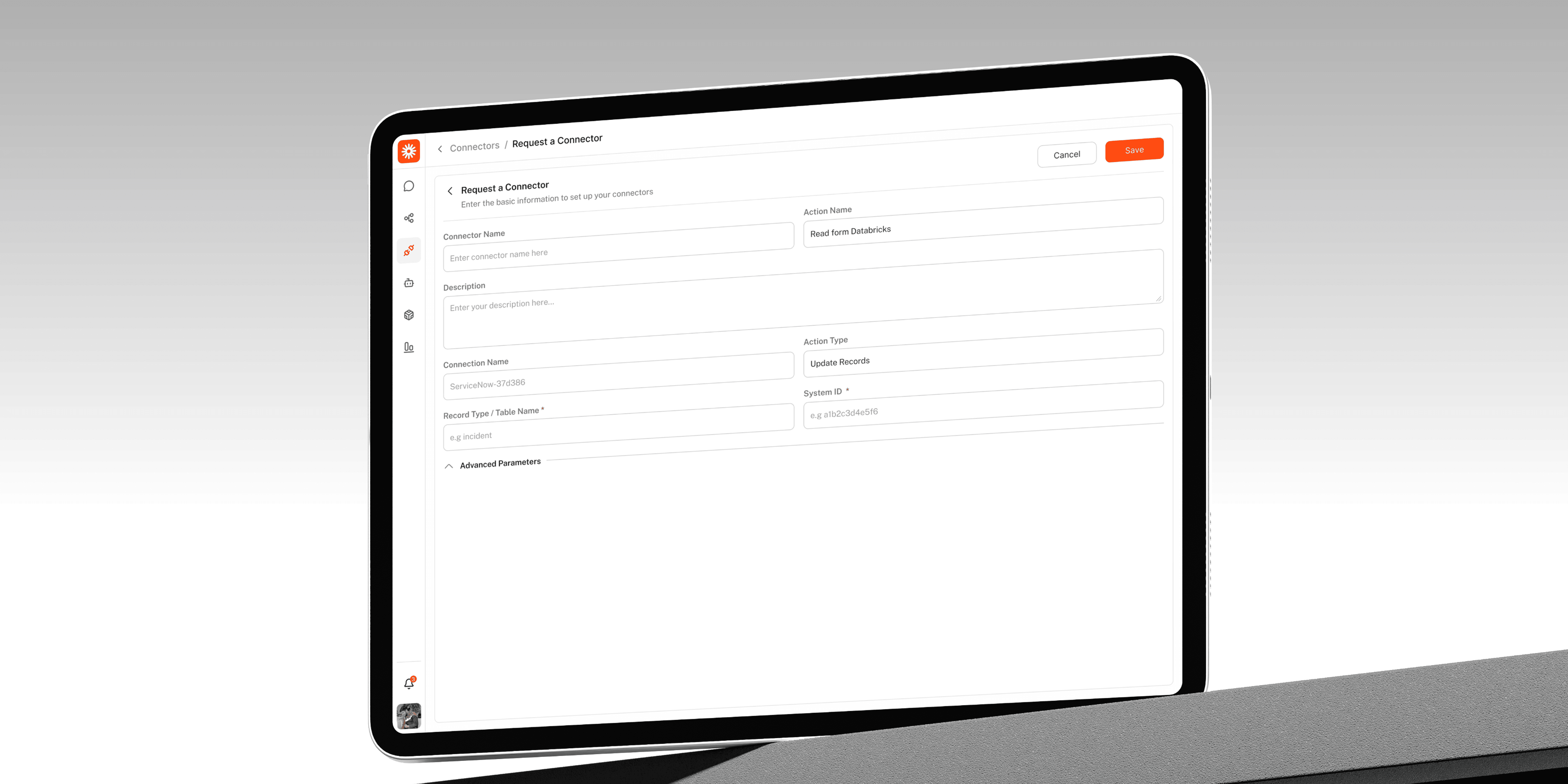
Inline Validation with Helpful Specificity
Form validation messages are specific to the actual error, not generic ("This field is required" → "Agent name can only contain letters, numbers, and underscores — no spaces"). Where errors relate to downstream system consequences (e.g., a connector that will fail at runtime), the validation appears at config time, not at run time.
Pattern: Inline Validation with Specific Feedback
What happens: Clear, contextual error messages shown during configuration
Why it matters: Reduces runtime failures and confusion
Impact: Smoother setup and fewer failed executions


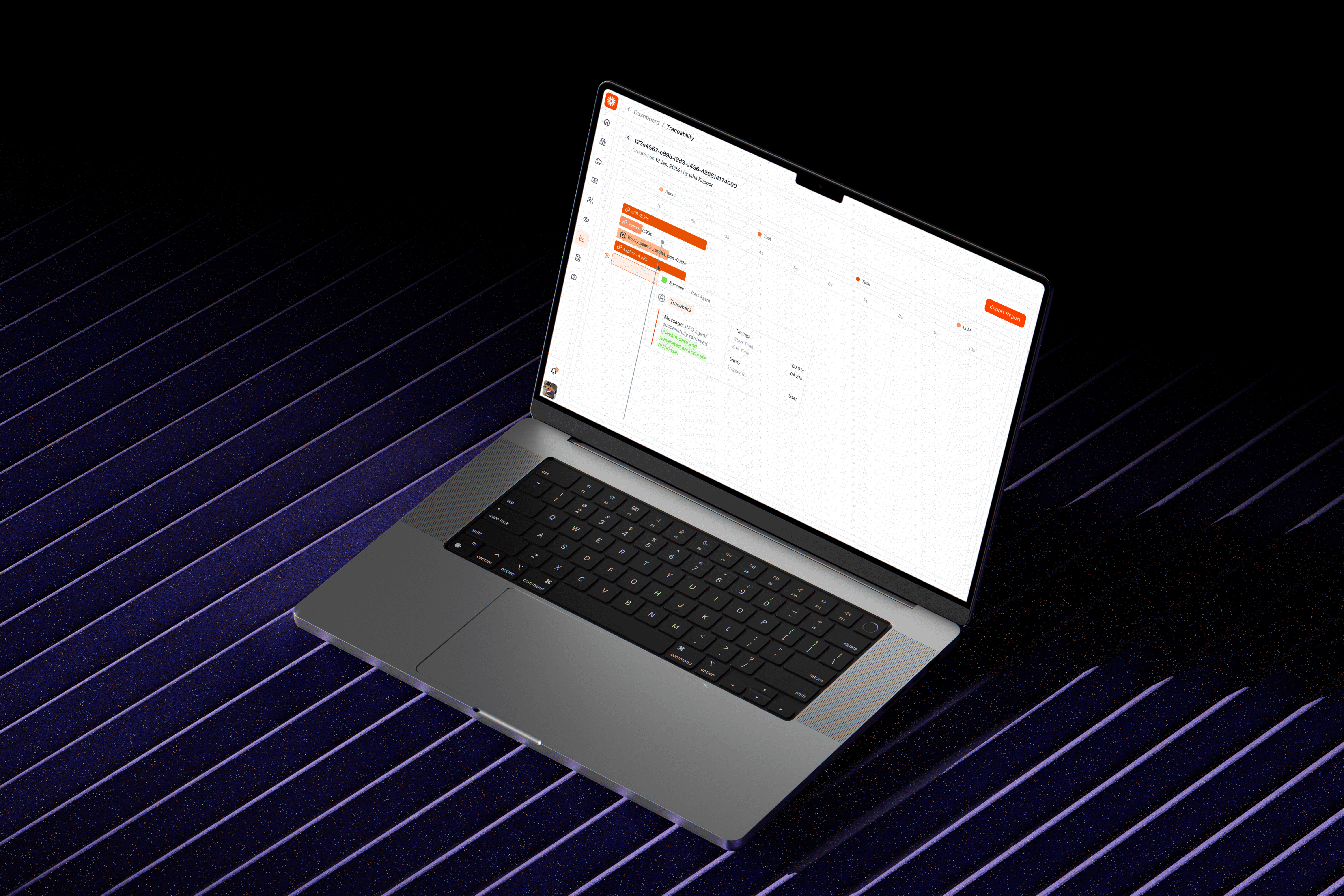
Admin Observability Dashboard
Information hierarchy prioritises anomalies and alerts at the top — admins need to see what needs attention first, not metrics first. Below: platform-wide usage metrics, followed by a live activity feed filterable by user, agent, time range, and outcome. Every agent execution is clickable to reveal the full prompt-to-outcome trace.
Pattern: Priority-Based Information Hierarchy
What happens: Critical anomalies and alerts surface at the top, followed by platform metrics and a filterable live activity feed
Why it matters: Admins focus on issues first, not passive data
Impact: Faster issue detection and response time
Impact & Results
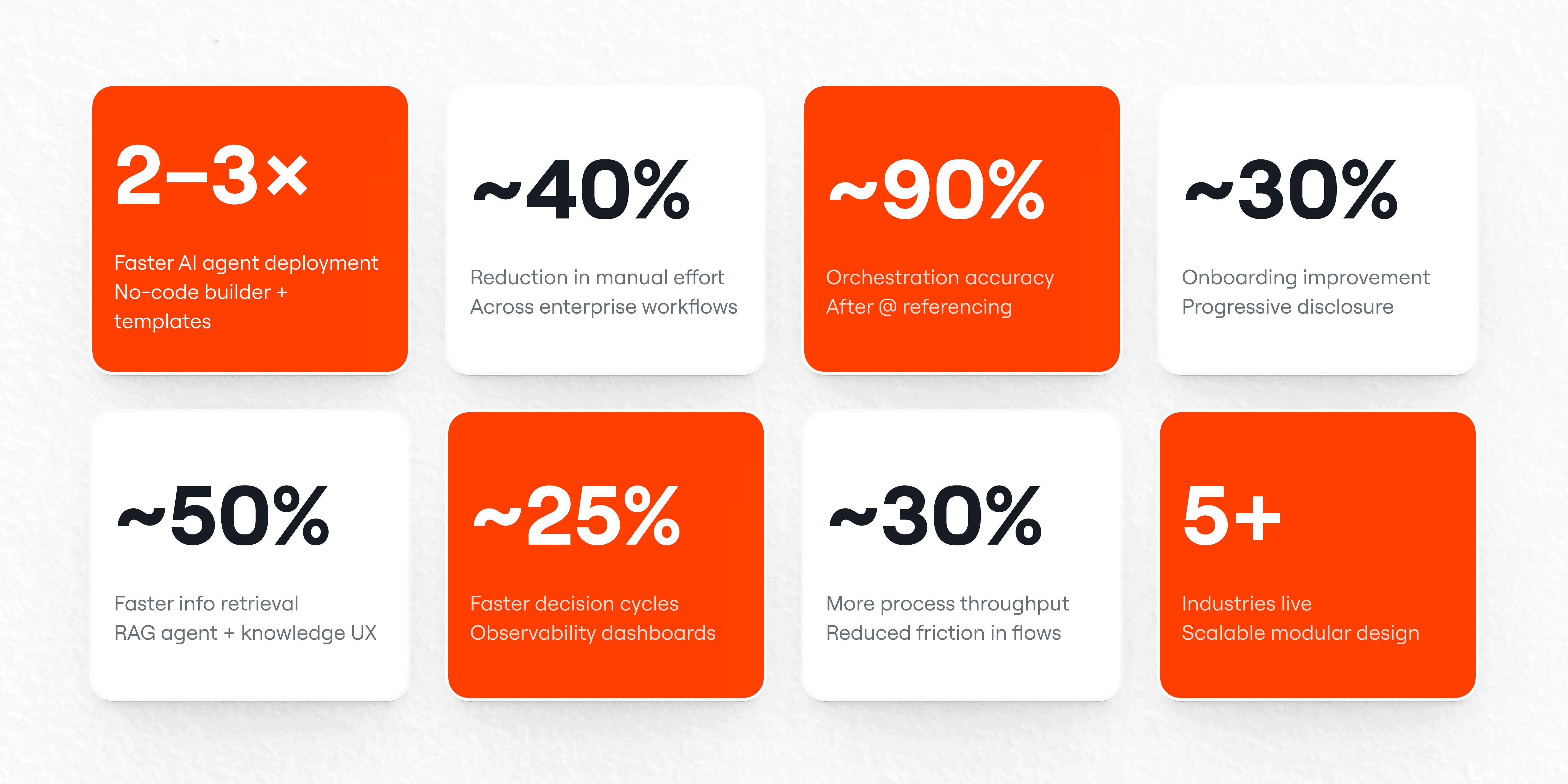
Every metric presented here is directly tied to a specific design decision, not just overall product performance. This ensures that each outcome reflects the real impact of UX improvements — from reducing complexity to increasing trust and usability.
Instead of measuring surface-level engagement, the focus was on evaluating how design changes influenced user behavior, efficiency, and business outcomes.
Industry Outcomes Enabled by Design
Manufacturing
Use Case: Predictive maintenance automation
Outcome: 85% reduction in unplanned downtime
Design Enabler: Workflow builder + real-time agent visibility
Banking (BFSI)
Use Case: Loan processing automation
Outcome: Reduced processing time from 30 days to ~4 hours
Design Enabler: Multi-agent orchestration + document-focused UX
Healthcare
Use Case: Patient service automation
Outcome: 90%+ interactions automated
Design Enabler: Guided configuration + human-in-the-loop design
Retail & CPG
Use Case: Inventory replenishment
Outcome: 98.5% in-stock rate, 25% cost reduction
Design Enabler: Data connector UX + real-time agent integration
Energy
Use Case: Predictive asset intelligence
Outcome: 60% faster maintenance response
Design Enabler: Monitoring dashboards + live agent tracking
Learnings & Reflection
Designing this product reinforced that AI UX is not just about usability — it directly shapes how the system behaves, how much users trust it, and whether it gets adopted at all. Many decisions that seemed like interface choices had deeper functional implications, influencing accuracy, efficiency, and reliability. This project highlighted the importance of designing with both user experience and system behavior in mind, while continuously balancing guidance, flexibility, and trust.
Core Takeaways from the Experience
UX decisions in AI products directly impact system behavior and outcomes, not just usability
Small interaction patterns (like @ referencing) can define core product reliability
Investing early in a design system compounds speed and consistency over time
Enterprise users prefer guided experiences with strong defaults, not unlimited flexibility
Progressive disclosure is key to balancing simplicity and power
Trust is the primary driver of AI adoption, not just ease of use
Transparency in system behavior is essential to reduce user anxiety and increase confidence
Designing for AI requires thinking beyond screens — into how the system thinks, acts, and responds
Observability and feedback loops are critical for user control and decision-making
Agent transparency (showing reasoning, not just output) remains a major opportunity area


Conclusion
This is a product that only works if people trust it enough to hand their workflows to an AI they can't see thinking.
That trust doesn't come from the model. It comes from the interface — how clearly it communicates what agents are doing, how confidently users can configure them, how gracefully the system fails when something goes wrong. Every design decision on this product was ultimately a trust decision.
Final Thought
The hardest part of designing Agent Garage wasn't the complexity. It was that the product had no margin for confusion — because when a user misunderstands an AI orchestration platform, they don't just get frustrated. The workflow breaks, the business process stops, and the technology gets blamed.
"The best AI product isn't the most intelligent one — it's the one people actually trust enough to use."